
 简体中文
简体中文
sslTunnel document
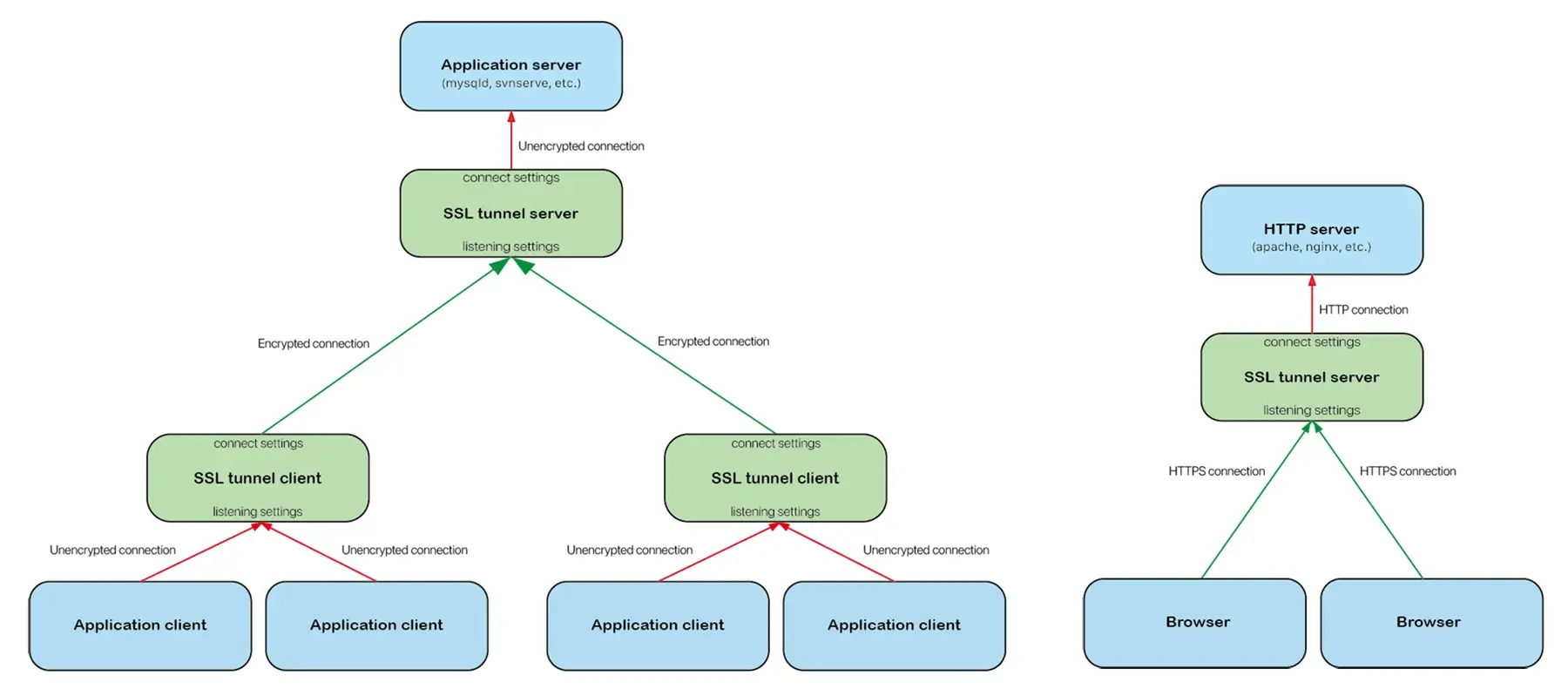
sslTunnel is free software used to secure traffic running between a TCP client and server. It is designed to work as an SSL encryption wrapper, encrypting the messages using TLS/SSL and allowing for secure communication without changing the program running on either side of the TCP connection.
Installation
Debian, Ubuntu
Download the appropriate
.debpackage from our download page, then install it:sudo dpkg -i ssltunnel-linux-XXXX.deb
Edit the configuration file
/etc/ssltunnel/config.json, define your tunnels in it.Start the
ssltunnelservice.sudo systemctl start ssltunnel.service
CentOS,Rocky,AlmaLinux,Oracle linux, Springdale, Fedora, RedHat
Download the appropriate
.rpmpackage from our download page, then install it:sudo yum install ssltunnel-linux-XXXX.rpm # or 'sudo dnf install ssltunnel-linux-XXXX.rpm'
Edit the configuration file
/etc/ssltunnel/config.json, define your tunnels in it.Start the
ssltunnelservice.sudo systemctl start ssltunnel.service
macOS, Windows, FreeBSD, OpenBSD, NetBSD, DragonFly, other Linux
Download the appropriate
.zippackage from our download page, then decompress it.Optionally, create a user to run the
ssltunnel.Create a configuration file
ssltunnel.json, define your tunnels in it.Start the
ssltunnel:sudo ssltunnel --daemon --config=ssltunnel.json
Command line
Usage
# Run as a daemon service
ssltunnel --daemon [--config=<CONFIG_FILE>] [--foreground] [--show-pid]
          [--theme=auto|mono|light|dark] [--language=auto|en-us|zh-cn]
          [--level=0|1|2|3|4]

# Display current configuration
ssltunnel --show-config [--config=<CONFIG_FILE>] [--passphrase] [--final]
          [--theme=auto|mono|light|dark] [--language=auto|en-us|zh-cn]
          [--level=0|1|2|3|4]

# Display version information
ssltunnel --version
          [--theme=auto|mono|light|dark] [--language=auto|en-us|zh-cn]
          [--level=0|1|2|3|4]

# Display the usage
ssltunnel --help [--daemon] [--show-config] [--version] [--exit-code]
          [--config-desc]
          [--theme=auto|mono|light|dark] [--language=auto|en-us|zh-cn]
          [--level=0|1|2|3|4]
Options
--daemon: Run as a service. When used in conjunction with the--helpoption, it displays help information for the "run as service" command.--show-config: Displays the current configuration. When used in conjunction with--helpoption, it outputs the help information for the "display current configuration" command.--version: Displays version information. When used in conjunction with--helpoption, it outputs the help information for the "display version information" command.--help: Display help information about ssltunnel.--config=<CONFIG_FILE>: Specifies the configuration file. If not specified, the following files are used in order.Unix/BSD/Linux:
The
ssltunnel.jsonfile in the directory where the ssltunnel command is located.The
~/.config/ssltunnel/config.jsonfile.The
/etc/ssltunnel/config.jsonfile.
macOS:
The
ssltunnel.jsonfile in the directory where the ssltunnel command is located.The
~/.config/ssltunnel/config.jsonfile.The
~/Library/Application Support/ssltunnel/config.jsonfile.The
/Library/Application Support/ssltunnel/config.jsonfile.
Windows:
The
ssltunnel.jsonfile in the directory where the ssltunnel command is located.The
C:\Users\<USERNAME>\AppData\Roaming\ssltunnel\config.jsonfile.The
C:\ProgramData\ssltunnel\config.jsonfile.
--foreground: Used in conjunction with--daemonoption, runs ssltunnel in the foreground using the current user and group, without creating a new process. By default, ssltunnel will read the configuration file, then fork a new process using the user and group specified in the configuration, and exit the current process.--show-pid: Used in conjunction with--daemonoption to display the Process ID (PID). If the --foreground option is not specified, the Process ID of the newly forked process is displayed.--passphrase: Used in conjunction with the--show-configoption to display the certificate private key's pass phrase when showing the current configuration.--final: Used in conjunction with the--show-configoption to display the final configuration, including the loaded certificate content, when showing the current configuration.--exit-code: Used in conjunction with the--helpoption to output an explanation of the program's exit codes.--config-desc: Use in conjunction with--helpoption to output configuration file descriptions.--language=auto|en-us|zh-cn: Select your preferred language for output text.auto: Automatically select output language based on system settings (default).en-us: Output will be in English.zh-cn: Output will be in Simplified Chinese.
--theme=auto|mono|light|dark: Specify how to colorize the output.auto:Automatic selection based on the terminal window's background color (default).mono: Disable to colorize the output.light: Make the output fit the light background.dark: Make the output fit the dark background.
--level=0|1|2|3|4: Specify the output level of command line messages.0: Output only fatal errors.1: Output all errors.2: Output all errors and warnings.3: Output all errors, warnings and messages.4: Output all errors, warnings, messages, and debug information.
Exit codes
0: A background process is started and current process closes, or the foreground/background service process terminated cleanly.1: Invalid command line options.2: Invalid configuration file.3: Invalid user or group name to run the program.4: The program exit timed out, it has been forcibly terminated.5: The superuser is required to displaying the pass phrase of certificate private key.6: Failed to encode configuration file.7: Failed to create temporary configuration file.8: Failed to fork background service process.
Configuration file
# sslTunnel 2 configuration file.

# The user who starts ssltunnel must have read permissions to the file. The user set below to run
# ssltunnel does not need any permissions on this file. Usually use the root user to start the
# ssltunnel, so set the owner and group of the configuration file to the root user, and set its
# permissions to 400.
{

    # Specifies a user to run the service as, defaults to an empty string, indicating that the
    # current user is to be used. If the --foreground option isn't specified, ssltunnel will fork
    # a new process with the user after running, and then terminate the current process. The user
    # does not need to have any permissions on this configuration file, certificate files, and
    # certificate private key files.
    "user": "ssltunnel",

    # Specifies a group to run the service as, defaults to an empty string, indicating that the
    # group of user specified by "user" (it is not empty) or group of current user ("user" is set
    # to empty) is to be used. If the --foreground option isn't specified, ssltunnel will fork a
    # new process with the group after running, and then terminate the current process.
    "group": "ssltunnel",

    # The tunnel definitions
    "tunnels": [

        # First tunnel definition
        {

            # Listening settings:
            # - When used as a ssl tunnel server: Listen for ssl tunnel client connections.
            # - When used as a ssl tunnel client: Listen for connections from downstream application
            #   clients.
            "listen": {

                # Tunnel listening address (supports both IPv4 and IPv6 address, blank indicates all
                # IPv4 and IPv6 addresses. The square brackets are not needed for IPv6).
                "address": "127.0.0.1",

                # Tunnel listening port.
                "port": 4120,

                # Server certificates.
                # - When used as a ssl tunnel server: Specifies the server certificates in order
                #   to listen for encrypted incoming connection from ssltunnel client. If multiple
                #   domain names are allowed to be used to connect to the server, a certificate
                #   needs to be specified for each domain name (general domain name certificates
                #   and multiple domain names certificates can also be used).
                # - When used as a ssl tunnel client: Don't specify the server certificates in
                #   order to listen for unencrypted incoming connections from application clients.
                #   The remaining listening settings ("client-auth", "client-verify", "ca", and
                #   "custom") will be ignored.
                "certs": [

                    # First certificate.
                    {

                        # The path to the certificate file, or the path to the full certificate
                        # chain file (if it is a relative path, it is based on the directory where
                        # the configuration file is located). The user who starts ssltunnel must
                        # have read permissions to the file. The user set above to run ssltunnel
                        # does not need any permissions on this file.
                        "cert": "...",

                        # The private key file path (if it is a relative path, it is based on the
                        # directory where the configuration file is located). The user who starts
                        # ssltunnel must have read permissions to the file. The user set above to
                        # run ssltunnel does not need any permissions on this file. Usually use the
                        # root user to start the ssltunnel, so set the owner and group of the
                        # certificate private key file to the root user, and set its permissions to
                        # 400.
                        "key": "...",

                        # Specifies the pass phrase if the private key is encrypted,otherwise the
                        # user will be prompted for a pass phrase on starting the ssltunnel.
                        "passphrase": "..."

                    },

                    # Other certificates.
                    ...

                ],

                # Determines the server's policy for TLS client authentication.
                #  - no:       Indicates that no client certificate should be requested during the
                #              handshake, and if any certificates are sent they will not be
                #              verified.
                #  - request:  Indicates that a client certificate should be requested during the
                #              handshake, and that at handshake, but does not require that the
                #              client send any certificates.
                #  - any:      Indicates that a client certificate should be requested during the
                #              handshake, and that at least one certificate is required to be sent
                #              by the client, but that certificate is not required to be valid.
                #  - optional: Indicates that a client certificate should be requested during the
                #              handshake, but does not require that the client sends a certificate.
                #              If the client does send a certificate it is required to be valid.
                #  - required: Indicates that a client certificate should be requested during the
                #              handshake, and that at least one valid certificate is required to be
                #              sent by the client.
                "client-auth": "required",

                # Determines how the server verifies client certificates:
                #  - cert: Only verify the end-entity (leaf) client certificate against a
                #          certificate specified in "ca" below.
                #  - ca:   Verify the client certificate chain starting from the root CA certificate
                #          specified in "ca" below.
                "client-verify": "ca",

                # Certificate Authority files, specifies one or multiple certificates, to be used to
                # verify client certificates. If a relative path is used, it is based on the
                # directory where the configuration file is located. It's required if "client-auth"
                # above is set to "optional" or "verify". The user who starts ssltunnel must have
                # read permissions to these files. The user set above to run ssltunnel does not need
                # any permissions on these files.
                # - When "client-verify" above is set to "cert": Specifies all end-entity (leaf)
                #   client certificates here. Multiple certificate files can be specified, each file
                #   can contain multiple end-entity (leaf) client certificates.
                # - When "client-verify" above is set to "ca": Specifies the issuing certificate
                #   chain starting with the root CA certificate for all client certificates.
                #   Multiple certificate chain files can be specified.
                "ca": [

                    # First certificate file or certificate chain file.
                    "...",

                    # Other certificate file or certificate chain file.
                    ...

                ],

                # Optional custom configuration. See Custom Configuration.
                "custom": "MinVersion: tls1.2; CurvePreferences: X25519, P256; ..."

            },

            # Connection settings:
            # - When used as a ssl tunnel server: Connect to the upstream application server.
            # - When used as a ssl tunnel client: Connect to the ssl tunnel server.
            "connect": {

                # Destination address for connection. It can be an IP address (both IPv4 and IPv6
                # are supported, and the square brackets are not needed for IPv6.) or a domain name.
                # If the connection destination is TLS/SSL server, the domain name generally needs
                # to be specified here, otherwise a domain name needs to be specified in the
                # "server-name" below so that the server provides an appropriate certificate.
                "address": "domain.com",

                # Destination port for connection.
                "port": 3690,

                # Connection timeout (seconds), its default value is 10 seconds.
                "timeout": 10,

                # Specifies whether the connected server is an TLS/SSL encryption server. If it is
                # set to false, the remaining connect settings ("server-name", "certs",
                # "server-verify", "ca", and "custom") will be ignored.
                # - When used as a ssl tunnel server: Set to false in order to connect to the
                #   upstream application server.
                # - When used as a ssl tunnel client: Set to true in order to connect to the ssl
                #   tunnel server.
                "tls": true,

                # Specifies the server name indication extension sent by the client. the value of
                # "address" above will be used if it isn't set. It's required if the "address" is
                # set to a IP address, and it must match least one server certificate.
                "server-name": "domain.com",

                # Specify the client certificate if the server needs to verify the client
                # certificate.
                "certs": [

                    # First certificate.
                    {

                        # The path to the certificate file, or the path to the full certificate
                        # chain file (if it is a relative path, it is based on the directory where
                        # the configuration file is located). The user who starts ssltunnel must
                        # have read permissions to the file. The user set above to run ssltunnel
                        # does not need any permissions on this file.
                        "cert": "...",

                        # The private key file path (if it is a relative path, it is based on the
                        # directory where the configuration file is located). The user who starts
                        # ssltunnel must have read permissions to the file. The user set above to
                        # run ssltunnel does not need any permissions on this file. Usually use the
                        # root user to start the ssltunnel, so set the owner and group of the
                        # certificate private key file to the root user, and set its permissions to
                        # 400.
                        "key": "...",

                        # Specifies the pass phrase if the private key is encrypted,otherwise the
                        # user will be prompted for a pass phrase on starting the ssltunnel.
                        "passphrase": "..."

                    },

                    # Other certificates.
                    ...

                ],

                # Determines how the client verifies server certificate:
                #  - skip: Don't verify the server certificate, the setting "ca" below will be
                #          ignored.
                #  - cert: Only verify the end-entity (leaf) server certificate against a
                #          certificate specified in "ca" below.
                #  - ca:   Verify the server certificate chain starting from the root CA certificate
                #          specified in "ca" below.
                "server-verify": "ca",

                # Certificate Authority files, specifies one or multiple certificates, to be used
                # to verify server certificate. If a relative path is used, it is based on the
                # directory where the configuration file is located.
                # It's required if "server-verify" above is set to "cert" or "ca", if not specified,
                # the list of trusted root certificates embedded in the operating system is used.
                # The user who starts ssltunnel must have read permissions to these files. The user
                # set above to run ssltunnel does not need any permissions on these files.
                # - When "server-verify" above is set to "cert": Specifies the end-entity (leaf)
                #   server certificate here.
                # - When "server-verify" above is set to "ca": Specifies the issuing certificate
                #   chain starting with the root CA certificate for the server certificate.
                "ca": [

                    # First certificate file or certificate chain file.
                    "...",

                    # Other certificate file or certificate chain file.
                    ...

                ],

                # Optional custom configuration. See Custom Configuration.
                "custom": ""

            }

        },

        # Other tunnel definitions.
        ...

    ],

    # Log definition.
    "log": {

        # Log file, if a relative path is used, it is based on the directory where the configuration
        # file is located. The "stderr" or "stdout" can be used. The "%y", "%m", "%d" and "%w" can
        # be used in log file name in order to rotate log:
        # - %y: 4-digit calendar year (e.g., 2026)
        # - %m: 2-digit month with a leading zero (e.g., 01-12)
        # - %d: 2-digit day with a leading zero (e.g., 01-31)
        # - %w: 2-digit week of the year with a leading zero (e.g., 01-53)
        "file": "stderr",

        # Log level, determining which logs are written to a log file. When you set a specific log
        # level, it acts as a minimum threshold, meaning that level and all higher (more severe)
        # levels will be recorded, while everything below it is discarded or filtered out.
        # - 0: Fatal (highest/most severe)
        # - 1: Error
        # - 2: Warning
        # - 3: Information
        # - 4: Debug (lowest/most verbose)
        "level": 3,

        # Specify the rendering time zone for log entry timestamps, e.g., "+0800", "-0300". defaults
        # to an empty string, indicating that the local time zone to be used.
        "timezone": "+0000",

        # Log format, it defines the structure that each log entry will have, entailing what data
        # to include, the order of presentation, and the separation elements used. following "%"
        # directives can be used in the format string:
        # - %p: Descriptions of log level (fatal, error, warning, message, debug)
        # - %t{.....}: The timestamp for log entries. The string within the curly braces specifies
        #   the time format, utilizing the Go language's time formatting conventions (e.g.,
        #   "%t{2006-01-02 15:04:05}")
        # - %e: Specifies to present the error information (if any, it will be presented on a new
        #   line, starting from the column where %e is located)
        # - %m: Log message
        "format": "%p %e[%t{2006-01-02 15:04:05}] %m",

        # The logs maximum cache size dictates how how many log items an application can store in
        # temporary memory before it must write to log file.
        "max-cache": 10,

        # Specifies whether to compress old log file to save space (in gzip format) when rotate
        # log.
        "compress": true,

        # Specifies the language of log message (e.g., "en-us", "zh-cn"), defaults to an empty
        # string, indicating that the value of "--language" option from the command line is to be
        # used.
        "language": ""

    }

}
Custom configuration
In the configuration file, you can optionally specify custom configurations for each tunnel's listening settings and connection settings separately. The custom configuration value is a string that can contain multiple setting items separated by semicolons. Each setting item includes a name and a value separated by colons. For example:
"custom": "MinVersion: tls1.2; CipherSuites: RSA-RC4_128_SHA,ECDHE_RSA-RC4_128_SHA; CurvePreferences: P256; SessionTicketsDisabled: true"
Available setting items include:
MinVersion: Minimum TLS version that is acceptable. Available values include:tls1.0tls1.1tls1.2tls1.3ssl3.0
MaxVersion: Maximum TLS version that is acceptable. Available values include:tls1.0tls1.1tls1.2tls1.3ssl3.0
NextProtos: A list of supported application level protocols, in order of preference. If both peers support ALPN, the selected protocol will be one from this list, and the connection will fail if there is no mutually supported protocol. If it isn't specified or the peer doesn't support ALPN, the connection will succeed.CipherSuites: A list of enabled TLS 1.0–1.2 cipher suites separated by commas (Note that TLS 1.3 ciphersuites are not configurable). The order of the list is ignored. If not specified, a safe default list is used. Available items include:RSA-RC4_128_SHARSA-3DES_EDE_CBC_SHARSA-AES_128_CBC_SHARSA-AES_256_CBC_SHARSA-AES_128_CBC_SHA256RSA-AES_128_GCM_SHA256RSA-AES_256_GCM_SHA384ECDHE_ECDSA-RC4_128_SHAECDHE_ECDSA-AES_128_CBC_SHAECDHE_ECDSA-AES_256_CBC_SHAECDHE_RSA-RC4_128_SHAECDHE_RSA-3DES_EDE_CBC_SHAECDHE_RSA-AES_128_CBC_SHAECDHE_RSA-AES_256_CBC_SHAECDHE_ECDSA-AES_128_CBC_SHA256ECDHE_RSA-AES_128_CBC_SHA256ECDHE_RSA-AES_128_GCM_SHA256ECDHE_ECDSA-AES_128_GCM_SHA256ECDHE_RSA-AES_256_GCM_SHA384ECDHE_ECDSA-AES_256_GCM_SHA384ECDHE_RSA-CHACHA20_POLY1305_SHA256ECDHE_ECDSA-CHACHA20_POLY1305_SHA256
CurvePreferences: Specifies the elliptic curves that will be used in an ECDHE handshake, in preference order, separated by commas. If not specified, the default will be used. The connect settings will use the first preference as the type for its key share in TLS 1.3. Available item include:P256P384P521X25519
DynamicRecordSizingDisabled: Specifies whether to disable adaptive sizing of TLS records. Available values includetrueandfalse. Whentrue, the largest possible TLS record size is always used. Whenfalse, the size of TLS records may be adjusted in an attempt to improve latency.SessionTicketsDisabled: Specifies whether to disable session ticket and PSK (resumption) support. Available values includetrueandfalse. It may be set to true to disable session ticket and PSK (resumption) support. Note that this setting item is only valid in the listening setting.
